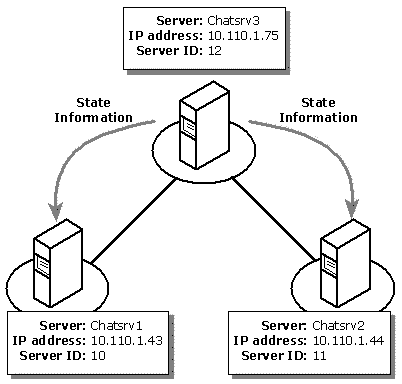
The primary difference between a single-server installation and a network of two or more chat servers is the configuration of portals. A portal represents the connection between two chat servers on a network. Each portal consists of a name, an IP address, a port number, and a unique server ID number, which identifies the chat server at the other end of the portal. This scenario uses the arbitrary server ID numbers of 10, 11, and 12 for each of the three servers.
Important Microsoft Exchange Chat Service version 5.5 Service Pack 1 does not support mixed-version chat networks. You cannot connect a chat server running this version with servers running earlier versions of the Chat Service product (Internet Chat Server 1.0 or Microsoft Exchange Chat Service version 5.5).
If you are unfamiliar with any terms used in this scenario, see Glossary.
To build a network of three chat servers that are accessible to Internet users.
Microsoft® Windows NT® Server version 4.0 with Service Pack 3 and Microsoft Exchange Chat Service 5.5 Service Pack 1 installed on each server.
A Windows NT network.
Using the default connection limit of 1,000 for each server, this chat network can support up to 3,000 simultaneous users across the Internet. The following illustration shows the complete network and the propagation of state information.