To Configure the Third Chat Server
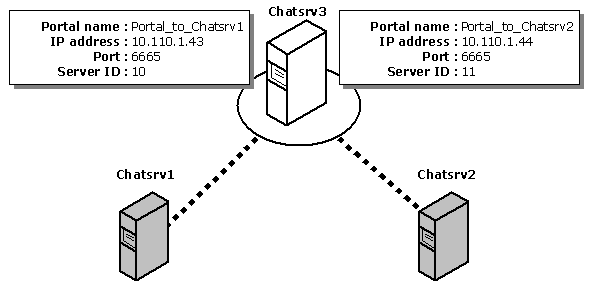
Finally, assign a Server ID to Chatsrv3, and then create a portal between Chatsrv3
and Chatsrv1, and another between Chatsrv3 and Chatsrv2.
- Select Chatsrv3 under Microsoft Exchange Chat Service in the left pane.
- From the Action menu, choose Properties.
- From the Settings property sheet, set Server ID
number to 12, and then choose OK.
- Choose OK to acknowledge the message that warns you to restart
Chat Service. (You update the configuration changes to the service at the end of this
procedure.)
- Select Portals in the right pane.
- From the Action menu, choose New, and then choose Create portal.
- In the Create Portal property sheet, set the following options.
Set
|
To
|
| Portal name |
Portal_to_Chatsrv1 |
| IP address |
10.110.1.43 |
| Port |
6665 |
| Server ID number |
10 |
- Choose OK.
- Choose OK again to acknowledge the message that warns you to
restart Chat Service.
- From the Action menu, choose New, and then choose Create portal.
- In the Create Portal property sheet, set the following options.
Set
|
To
|
| Portal name |
Portal_to_Chatsrv2 |
| IP address |
10.110.1.44 |
| Port |
6665 |
| Server ID number |
11 |
Be sure you do not select Uplink to server.
You have already configured Chatsrv1 and Chatsrv2 to initiate uplinks to Chatsrv3.
- Choose OK.
- Choose OK again to acknowledge the message that warns you to
restart Chat Service.
- Select Chatsrv3 in the left pane, and then
update the configuration changes on the server.
© 1998 Microsoft Corporation. All rights reserved.