To Configure the First Chat Server
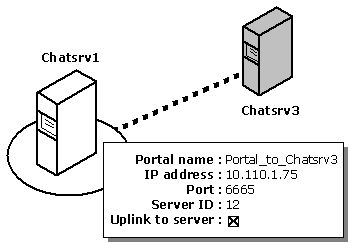
First, assign a Server ID to Chatsrv1, and then create a portal between Chatsrv1 and Chatsrv3.
- From the Chat Service Manager utility on Chatsrv1, select Chatsrv1 under Microsoft Exchange Chat Service in the left pane.
- From the Action menu, choose Properties.
- From the Settings property sheet, set Server ID
number to 10, and then choose OK.
- Choose OK to acknowledge the message that warns you to restart
Chat Service. (You update the configuration changes to the service at the end of this
procedure.)
- Select Portals in the right pane.
- From the Action menu, choose New, and then choose Create portal.
- In the Create Portal property sheet, set the following options.
Set
|
To
|
| Portal name |
Portal_to_Chatsrv3 |
| IP address |
10.110.1.75 |
| Port |
6665 |
| Server ID number |
12 |
- Select Uplink to server, and then choose OK.
This directs Chatsrv1 to initiate the connection to Chatsrv3 to acquire its
state information. The state information includes the server's persistent
and dynamic channels and their membership, users currently logged on to the service,
and any access restrictions that are in effect, such as user bans.
- Choose OK to acknowledge the message that warns you to restart
Chat Service.
- Select Chatsrv1 in the left pane, and then
update the configuration changes on the server.
© 1998 Microsoft Corporation. All rights reserved.